Adding Buttons
This documentation is still under construction. Please be patient while we flesh it out and improve. If you need any help, please drop by our Discord server
Simple RPC has a full in-game config screen, accessible from ModMenu or the Mods menu in NeoForge/Forge. You will need Cloth Config installed to use it.
Due to a very stupid change to discord last year, users can no longer see buttons on their own RPC. To see and test your buttons, you will need to ask a friend to check your profile, or, use an alt account to check your own profile.
THIS IS NOT A BUG IN THE MOD, BUT DISCORD BEING DISCORD
Discord does NOT allow more than 2 buttons per RPC. That means, only the first two buttons configured, will be shown on your profile.
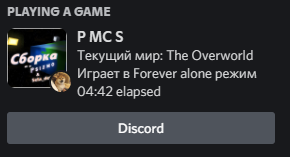
Example
Buttons on your discord RPC, allow you to link to a website, your discord server, or your modpack, so others can quickly find it/join your discord, with the push of a button.
All the configs provided by Simple RPC allow you to add buttons to them.
To add a new button, find the buttons = [] section in your config. You will need to remove this line completely, and replace it with the following:
[[SECTIONNAME.presence.buttons]]
  label = "My Test Button"
  url = "https://google.com"
Here is a full example, with a button added to the Main Menu event:
#The Main Menu event
[main_menu]
	#Enable/Disable the Main Menu Event
	enabled = true

	#List of RPCs that will be displayed at random
	[[main_menu.presence]]
		#The Activity type to use for this RPC. Valid types are: PLAYING, STREAMING, LISTENING, WATCHING, CUSTOM, COMPETING
		type = "PLAYING"
		#The first line of text under the app name
		description = "{{player.name}} is currently lazy"
		#The second line of text under the app name
		state = "Chilling in the menu"
		#The Asset ID or URLs of images to randomly use for the large image
		largeImageKey = ["mclogonew"]
		#The text to show when someone hovers over the largeImage
		largeImageText = "It's Minecraft {{game.version}}, but modded"
		#The Asset ID or URLs of images to randomly use for the small image
		smallImageKey = ["{{images.player}}"]
		#The text to show when someone hovers over the smallImage
		smallImageText = "{{player.name}}"
		#The Twitch or Youtube URL to use when type is set to STREAMING
		streamingActivityUrl = "https://twitch.tv/twitch"
		#List of buttons (max 2) to show on the RPC
		# REMOVE MEEEEEEE buttons = []

                [[main_menu.presence.buttons]]
                    label = "Google"
                    url = "https://www.google.com/"
Example with two buttons
#The Main Menu event
[main_menu]
	#Enable/Disable the Main Menu Event
	enabled = true

	#List of RPCs that will be displayed at random
	[[main_menu.presence]]
		#The Activity type to use for this RPC. Valid types are: PLAYING, STREAMING, LISTENING, WATCHING, CUSTOM, COMPETING
		type = "PLAYING"
		#The first line of text under the app name
		description = "{{player.name}} is currently lazy"
		#The second line of text under the app name
		state = "Chilling in the menu"
		#The Asset ID or URLs of images to randomly use for the large image
		largeImageKey = ["mclogonew"]
		#The text to show when someone hovers over the largeImage
		largeImageText = "It's Minecraft {{game.version}}, but modded"
		#The Asset ID or URLs of images to randomly use for the small image
		smallImageKey = ["{{images.player}}"]
		#The text to show when someone hovers over the smallImage
		smallImageText = "{{player.name}}"
		#The Twitch or Youtube URL to use when type is set to STREAMING
		streamingActivityUrl = "https://twitch.tv/twitch"
		#List of buttons (max 2) to show on the RPC
		# REMOVE MEEEEEEE buttons = []

                [[main_menu.presence.buttons]]
                    label = "Google"
                    url = "https://www.google.com/"

                [[main_menu.presence.buttons]]
                    label = "Discord"
                    url = "https://discord.firstdark.dev"
You can also use Placeholders in the button Label